
Container-Native AI: The DevOps On-Ramp to AI Infrastructure
Article 1 of 14 in the series “AI Infra, The Open Source Way” — for DevOps, Platform, and SRE folks who want to become AI Native without throwing away what they already know.

A while back, in one of my corporate workshops, a platform engineer walked in looking annoyed. His company had just received the Docker Desktop licensing email. That is the one which says: you have more than 250 employees now, so it is time to pay. Overnight, docker on his laptop had gone from a habit to a procurement ticket. He asked me, half joking, “So what do we do? Uninstall Docker and go back to VMs?”

In the same room, barely an hour later, another engineer said something I now hear everywhere: “AI is moving fast, and I feel like I am standing outside the room.”
Two different complaints. One answer. You do not go back to VMs, and you are not outside the AI room either. You go one level down, to the open standard underneath Docker. And that same standard, it turns out, is your on-ramp into AI. Let me show you why.
The three roads to AI Native
The way I see it, there are three roads a DevOps engineer can take into AI. I call this the AI Trinity for DevOps:
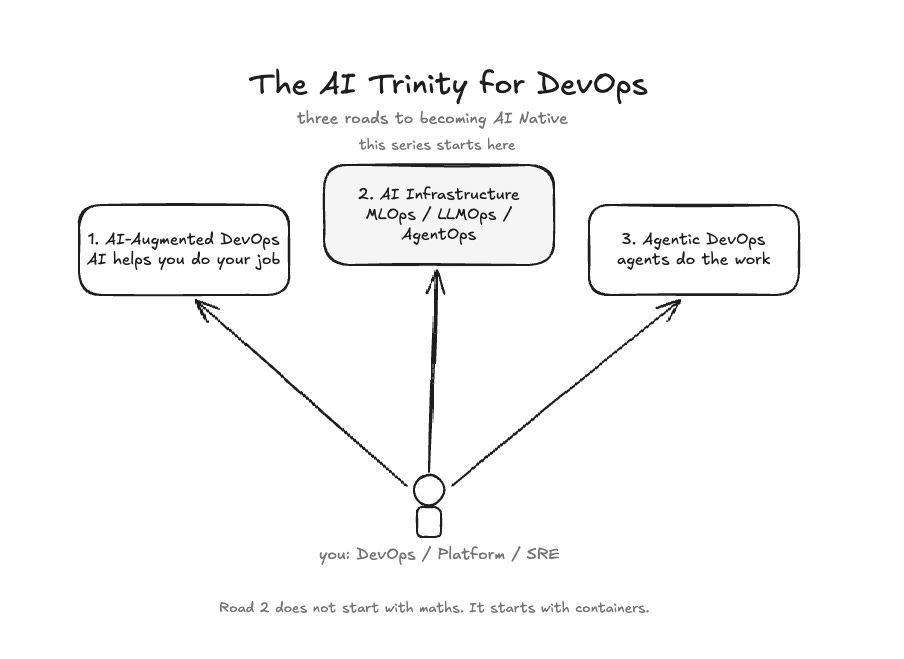
AI-Augmented DevOps. You use AI to do your existing job better. Copilots for your pipelines, agents that triage your alerts, AI that writes your Terraform.
AI Infrastructure. That is MLOps, LLMOps, and AgentOps. You build and run the platforms that AI workloads live on. Someone has to serve the models, wire the vector databases, package the artifacts, and keep the whole thing secure. That someone looks a lot like you.
Agentic DevOps. You build agents and agentic systems that do engineering work themselves.
This series walks the second road. And here is the important point: the second road does not start with mathematics or model training. It starts with something you already know very well. Containers.
You already have the skills. Really.
Ask yourself what an AI stack actually needs in production. It needs a model served behind an API. It needs a database. It needs an app. It needs images built, versioned, pushed to a registry, scanned, signed, and shipped through CI.
Sound familiar? It should. This is your day job with one new workload type on top.
So who is best placed to run AI infrastructure? Not the data scientist who trained the model. The engineer who has been packaging, serving, isolating, and shipping software for years. That is you.
But there is one decision to get right before anything else, and it is the subject of the rest of this article.
Container-native, not Docker-native
Imagine you are standing at a shipping yard. A crane lifts a steel box off a ship and sets it down on a waiting truck. Stop here for a second and notice what nobody at the yard is doing. Nobody opens the box to check what is inside. Nobody asks which company owns the truck. The crane operator would handle ten thousand of these boxes a year without knowing what a single one contains. Why? Because the box follows a standard. Every crane, every ship, and every truck in the world is built for the same box.
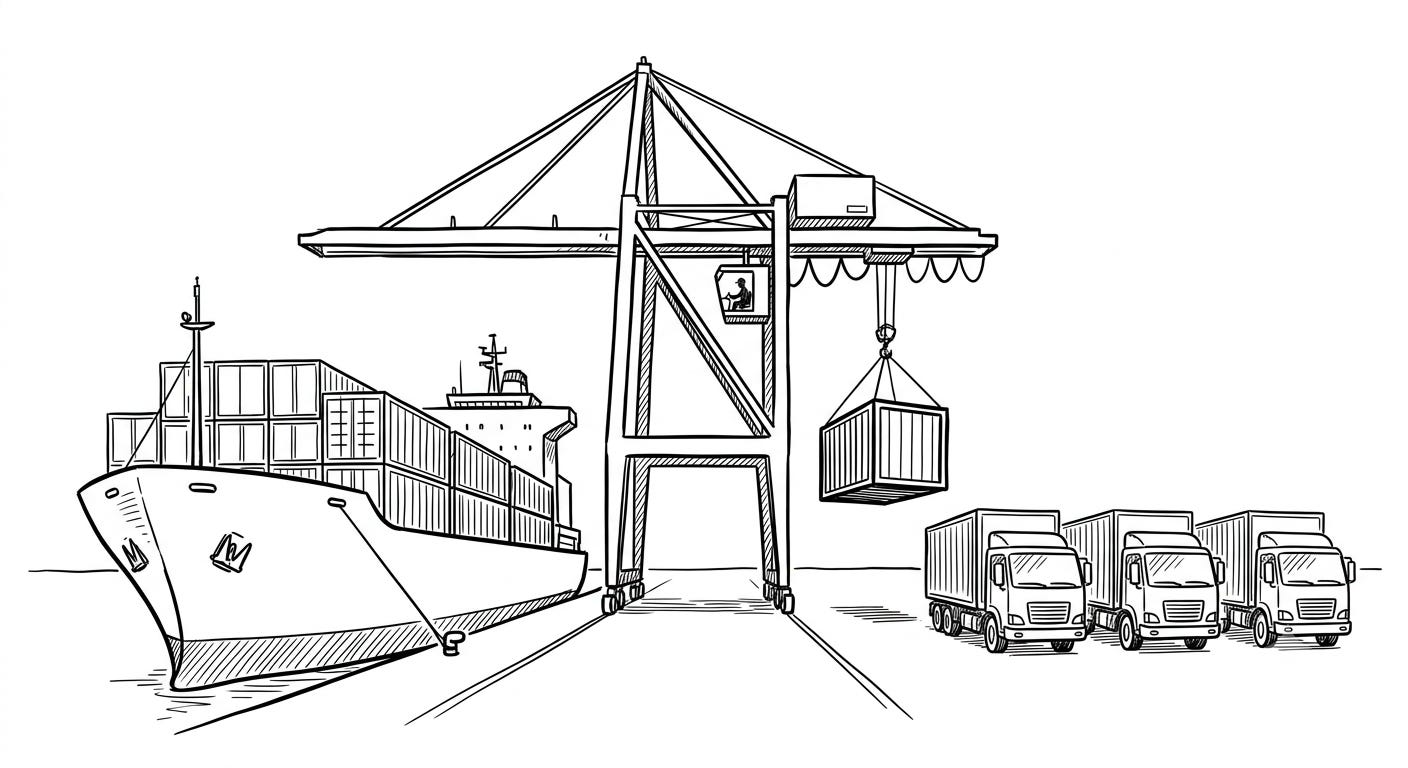
Your application is the cargo. The container spec is the box. And Docker, Colima, OrbStack, Rancher Desktop, and Podman? They are just the carriers. The yard does not belong to any one of them.
Now, why does this matter suddenly? Because Docker Desktop is now paid for organisations with more than 250 employees or 10 million dollars in revenue. That is the email my workshop participant got. That one pricing change broke a lazy assumption the whole industry had been carrying: that “container” means “Docker Desktop”.
But here is the good news. The standard underneath Docker is fully open. It has two parts:
The OCI image format, that is the standard for how container images are built and stored.
The Compose Spec, that is the standard for describing a multi-service stack in one file.
Every serious runtime implements both. So the same compose.yaml would run without any changes on Colima, OrbStack, Rancher Desktop, or Podman.
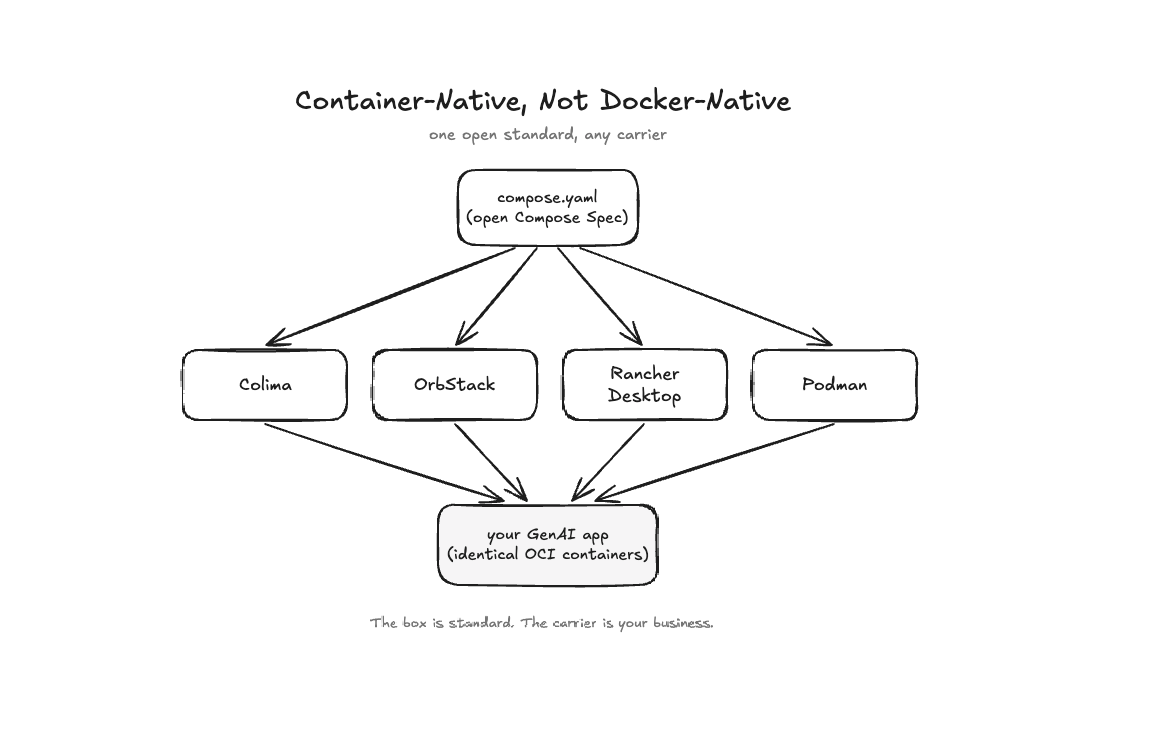
One file. Four runtimes. The same result. So the rule for this whole series is simple: we learn container-native, not Docker-native. Which carrier you pick is your business.
What do containers actually buy an AI stack?
Think of a container as a sealed shipment. The model server, the embedding pipeline, the vector database, and the agent each travel in their own sealed box. Any machine can open them.
Concretely, containers give an AI system four things:
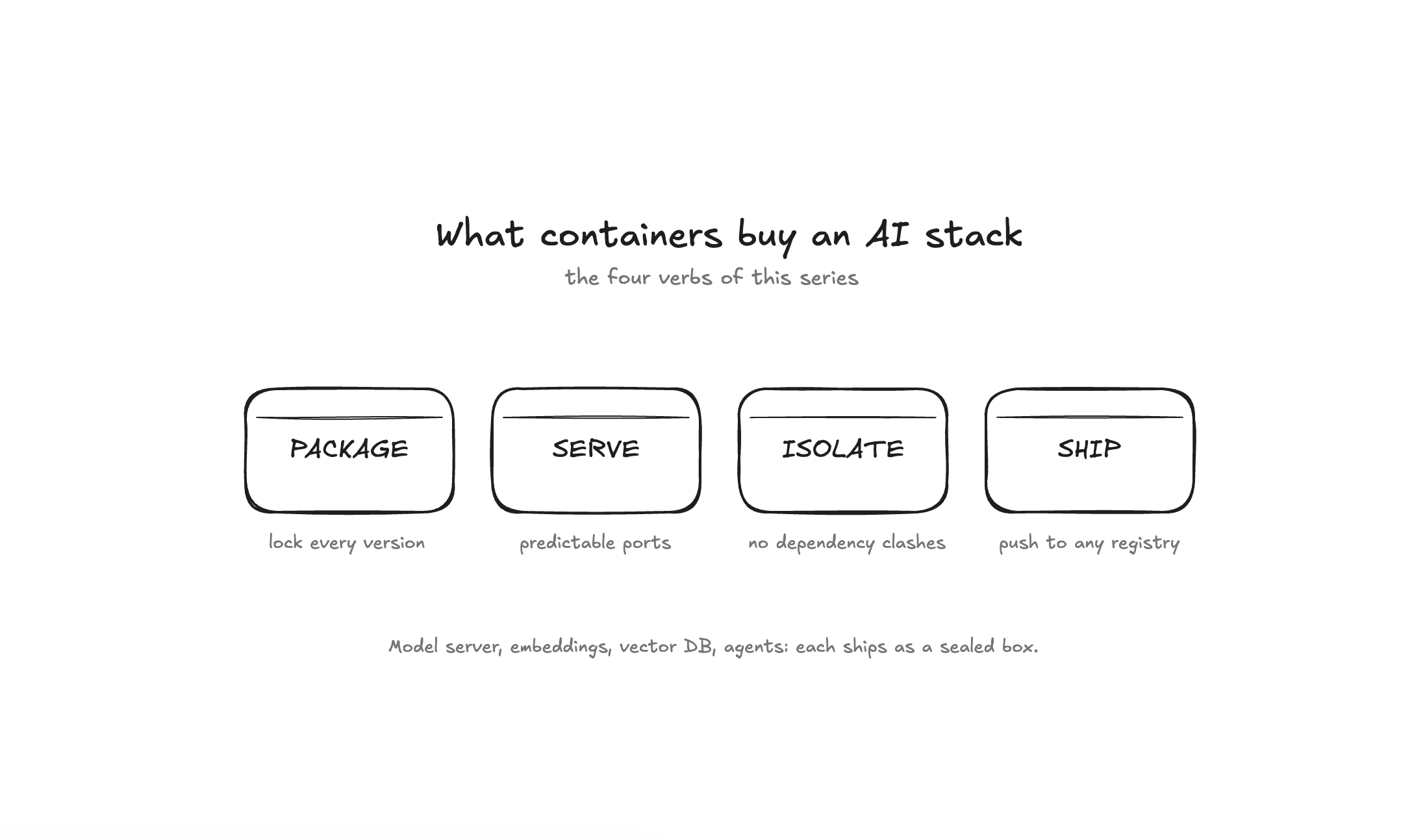
Role What it means in practice Package Lock the Python version, the CUDA driver, and every library version. “Works on my machine” becomes “works on every machine”. Serve Run the embedding service, the vector DB, and the gateway behind predictable ports. Nothing pollutes the host. Isolate Two AI frameworks with clashing dependencies? Each lives in its own container. No virtualenv juggling. Ship Push to any OCI registry, that is GHCR, Docker Hub, or Quay. Pull and run anywhere.
Package, serve, isolate, ship. Keep these four words in mind. Every article in this series is about one or more of them, applied to AI.
The one wrinkle: your laptop’s GPU
Now here is the catch, and I want you to know it exists before you run anything.
On Apple Silicon Macs, a container cannot see the GPU. macOS gives the container’s virtual machine CPUs and memory, but no graphics device. So a model running inside a container on a Mac would fall back to CPU, and what takes one second natively would take three to six in the container. You cannot fix this with configuration. It is a hard platform boundary.
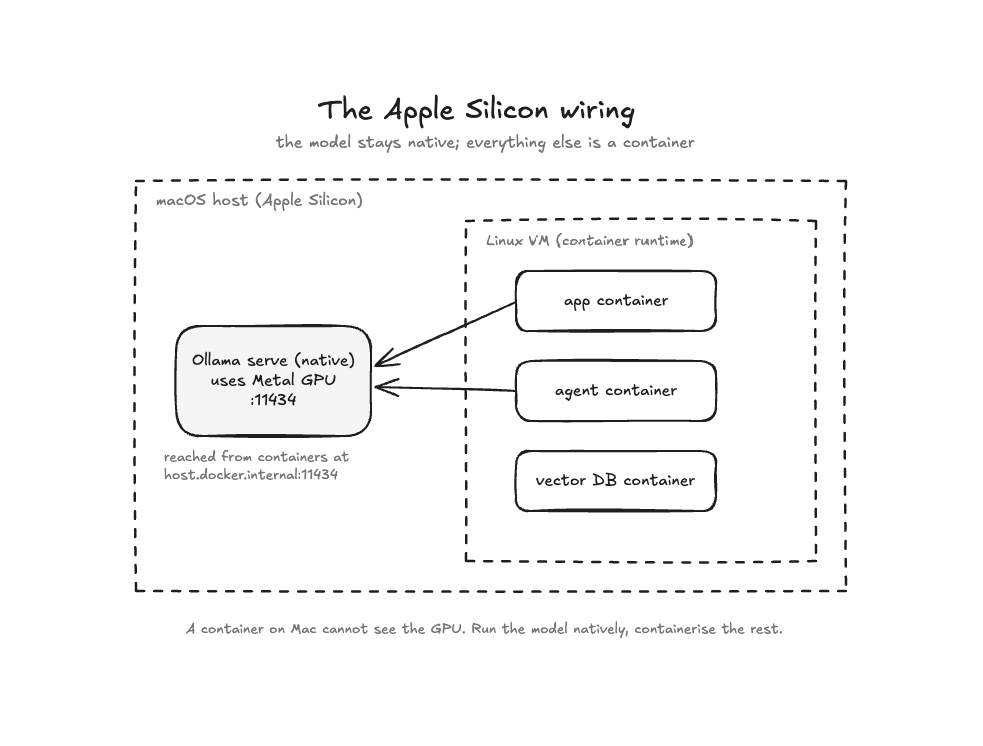
The pattern that solves it: run the model server natively on the Mac, where it can use the Metal GPU, and containerise everything else. The containers reach the model at one magic address:
http://host.docker.internal:11434
.
The next article is entirely about this. For now, just keep the picture in mind: the model stays native, everything else is a container.
Prove it yourself in a few minutes
Enough reading. Let’s prove the wiring works. We assume you have a container runtime installed (any of the four above) and Ollama installed natively.
Pull a small model. This one is under 1 GB:
ollama pull qwen2.5:1.5b
Check it is being served natively:
curl -s http://localhost:11434/api/tags
Now the real move. Start a throwaway container and call the model from inside it:
docker run --rm curlimages/curl:latest -s \
  http://host.docker.internal:11434/api/generate \
  -d '{"model":"qwen2.5:1.5b","prompt":"Say hi in 5 words.","stream":false}'
You should get back JSON with a "response" field and a short reply from the model. Stop here for a second and notice what just happened. A container, which is your world, just called a locally served LLM, which is the new world, over a standard HTTP API. That is the whole bridge. Everything we build in this series stands on it.
Where this series goes
Over the next thirteen weeks we will build one realistic system, one step at a time, and every step runs on a normal 16 GB laptop:
Serve a local model behind an OpenAI-compatible API, and swap engines without touching app code
Scale it with vLLM and understand batching and quantization
Package and version models as OCI artifacts, the same way you ship images
Build a RAG assistant over real runbooks, and see exactly where naive RAG breaks
Define an agent in plain Markdown files, with tools and guardrails
Grow it into a multi-agent incident crew
Secure the whole thing: guardrails, SBOM, scan, sign, eval
Ship it end to end, and prove portability by swapping the runtime
No GPU cluster and no cloud bill. Just the open container standard, open-source AI tools, and the skills you already have.
If you understand this well, the rest will be easy to figure out. See you in the next one.
This series is adapted from my 2-day hands-on workshop, Containers for GenAI & Agentic AI — The Open-Source Way, where we build this entire stack step by step on a regular 16 GB laptop. If your team wants to run it live, reach out. And if you want the next article, subscribe — it’s free.